
4.12Solar engine
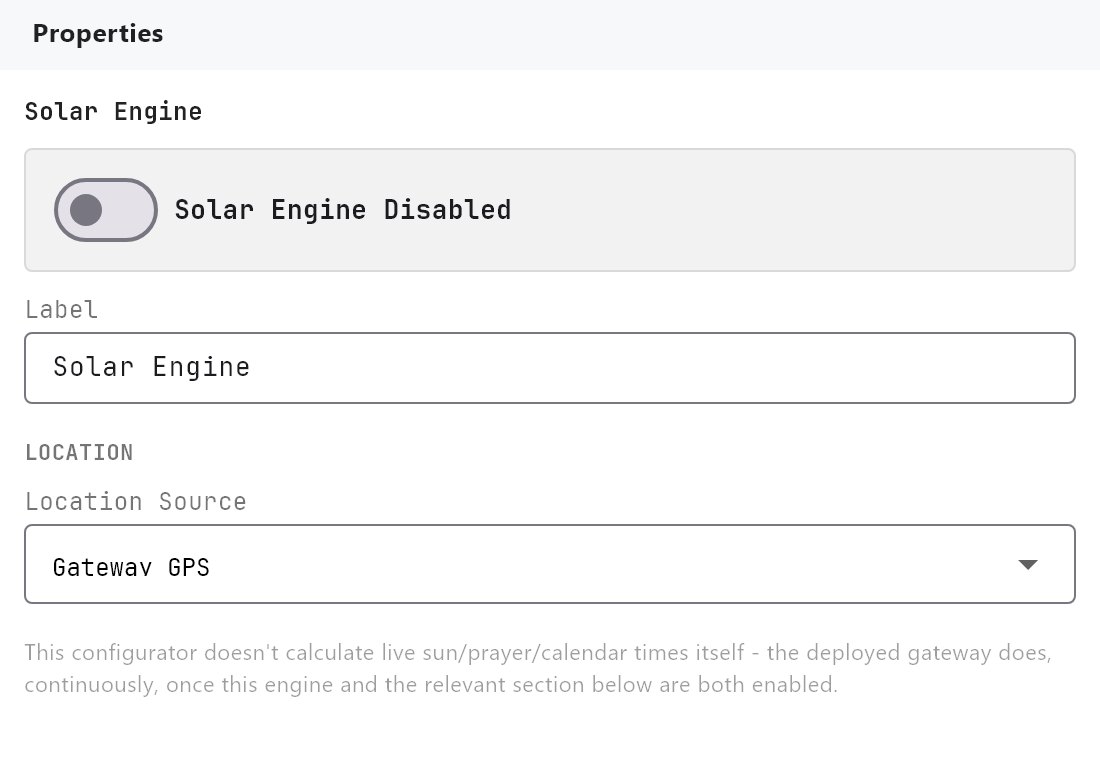
Sets the location and master switch used to calculate sun times, prayer times and calendar events, and runs their timed actions on the gateway.
The Solar engine is the parent of three calendar services: Solar events, Muslim prayer times and Christian events. It holds the location they all calculate for, and it is the master switch for their timed actions. You find it under Server > Engines > Solar Engine, with the three services listed beneath it.
#What it does
- Chooses the latitude, longitude and timezone used for all sun, prayer and calendar calculations.
- Is the master switch. The gateway runs timed actions only when Solar Engine is enabled and the matching child service is enabled too.
- Provides the calculation behind the sun and prayer values shown in the Configurator preview and in the Diagnostics page.
The four items share one set of project settings, so the location chosen here is also used for the prayer calculation.
#Before you enable it
- Set the gateway's Latitude, Longitude and Timezone under Server > Gateway, unless you will use a custom location below. Without a location nothing is calculated.
- Enable the child services that you need as well.
#Settings
| Setting | What it does |
|---|---|
| Enabled | Off by default. Master switch for timed actions of all three child services. |
| Label | The name shown in the Server list. Default Solar Engine. |
| Location Source | Gateway GPS (default) uses the latitude, longitude and timezone saved in the gateway properties. No (custom location) lets you type your own. |
| Latitude | Custom location only. Decimal degrees, for example 40.7128. |
| Longitude | Custom location only. Decimal degrees, for example -74.0060. |
| Timezone | Custom location only. For example UTC-5. |
With Gateway GPS selected, the page shows the values in use, for example Using gateway location: 25.0657, 55.1713, Asia/Dubai. Gateway GPS is only a name for the location saved in the gateway properties. Choosing a city there fills in the latitude and longitude, and you can also type them. Nothing is read from a GPS receiver.
#How the timezone is read
The gateway, the apps and the Configurator turn the timezone text into an hour offset. They understand:
- a timezone name such as
Asia/Dubai,Asia/Kolkata,Europe/LondonorAmerica/New_York. These follow daylight saving, so the offset is the one in force on the day being calculated, - an offset such as
UTC+4,GMT-5,+5:30orUTC-05:30, - a plain number such as
4.
If the text is not recognised, they fall back to the clock of the device doing the calculation. On the gateway this is the timezone applied to the gateway itself. In an app it is the phone or PC's own timezone, which can differ from the site.
#How it works on the gateway
- Once a second the gateway checks the current time in the project's timezone. When an event time (plus its action delay) matches the current minute, its actions run once.
- Sun times use a standard astronomical calculation from latitude, longitude and date. Sunrise and sunset use a sun position of 0.833 degrees below the horizon. Dawn and dusk use civil twilight, 6 degrees below the horizon. Solar noon is the midpoint.
- Dawn, sunrise, noon, sunset and dusk are recalculated every day.
- The apps calculate the values they display (for example sunrise on a State Action) themselves from the same project settings. These values do not depend on the Enabled switches.
Diagnostics shows the result. On the Other Engines tab, the Sun Engine card lists today's civil dawn, sunrise, solar noon, sunset and civil dusk. It says Enabled but no location is configured when latitude or longitude is missing.
#System values
Dashboard objects can show these values with Protocol = System Object, in the group Solar Values: Dawn, Sunrise, Noon, Sunset, Dusk, Azimuth and Elevation. See Using system objects, Analog Value and State Action. On a State Action, Format chooses AM/PM or 24-hour.
#Example
A project in Dubai.
- In Server > Gateway, set the latitude
25.0657, longitude55.1713and timezoneAsia/Dubai. - Enable Solar Engine, and leave Location Source on Gateway GPS.
- Enable Solar Events, then add actions as described on the Solar events page.
- Deploy. Open Diagnostics > Other Engines and check that the Sun Engine card shows today's times.
#Tips and common problems
- Times are an hour off. Check the timezone format (see above). Use
UTC+4style text if the zone name is not understood. - Actions never fire. Both Solar Engine and the child service must be enabled, and the project must be deployed.
- The Sun Engine card says no location. Fill in latitude and longitude in the gateway properties or the custom location.