
4.17SIP gateway
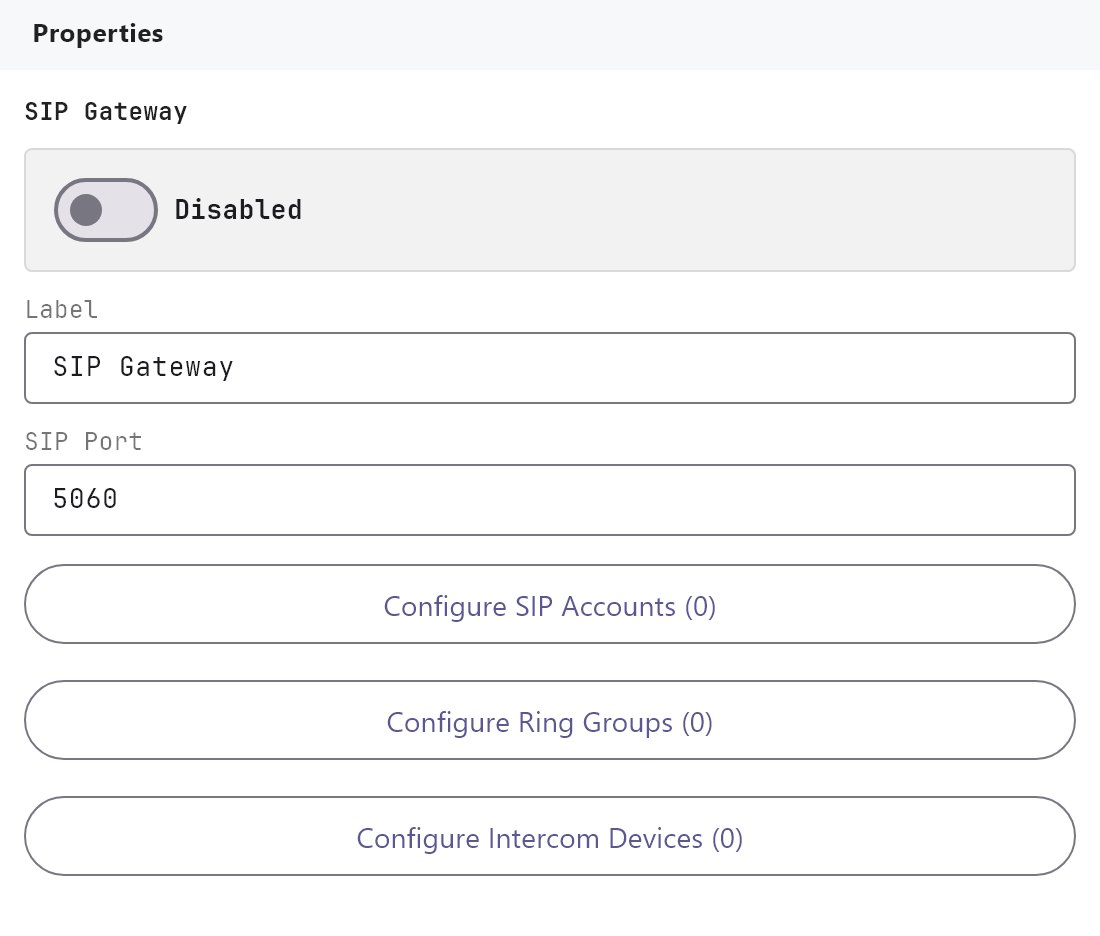
Reference for the SIP Gateway service: SIP port, extra SIP accounts, ring groups and intercom devices.
The SIP Gateway is the gateway's built-in SIP server for door stations and the apps. This page lists every setting of the service and its three editors. For the call flow and for programming the door station, follow Intercom and door stations.
#What it does
The gateway registers SIP extensions for the app users, for any extra accounts you add and for each door station. When a door station calls a ring group number, the gateway rings every registered member of that group and the first one to answer takes the call. The service publishes no System Objects. Its settings are used by the Intercom object and by the apps.
#Before you enable it
- The service is Disabled by default. The gateway ignores every setting on this page until you turn Enabled on and deploy the project (see Deploying to a gateway).
- App users get their extension in Server > Gateway > Users, not here.
- The generated SIP configuration uses the project's gateway address as its realm, so check the gateway address before the first deploy.
#Settings
| Setting | What it does |
|---|---|
| Enabled | Turns the SIP service on or off. Off by default. |
| Label | The name of the service in the Server tree. Default SIP Gateway. |
| SIP port | The UDP port the gateway listens on. 1 to 65535, default 5060. Door stations register to this port. |
| SIP Accounts | Opens the SIP Accounts editor. The button shows Collection (N), which counts your extra accounts plus the automatic app-user accounts. |
| Ring groups | Opens the Ring Group editor. The button shows the number of groups. |
| Intercom devices | Opens the Intercom Device editor. The button shows the number of devices. |
All three editors have the same list on the left with Add, Clone, Remove, Up and Down. Opening an editor that is empty creates the first item for you (Account 1, Ring Group 1 or Intercom 1). Edits are written to the project as you type. Cancel and Save Changes both only close the dialog.
#SIP Accounts editor
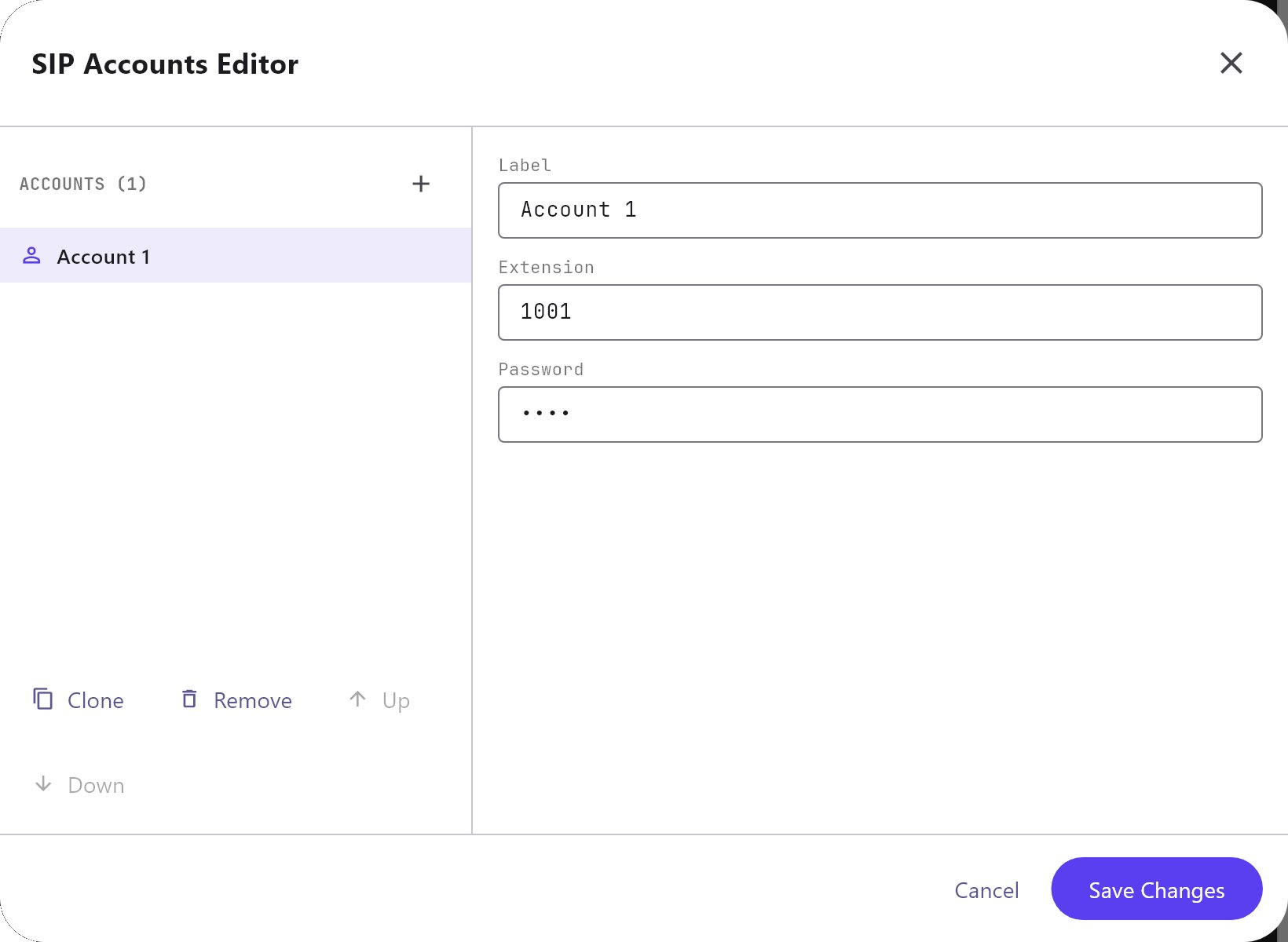
Use it for extensions that are not app users, for example an extra SIP phone. App users do not need an entry here: the list under the account list, Automatic app-user SIP accounts, shows every enabled user that has a SIP extension, and those can be used in ring groups automatically.
| Field | What it does |
|---|---|
| Label | A name for the account. New accounts are Account 1, Account 2 and so on. |
| Extension | The SIP number. New accounts start at 1001 and count up. Use digits only: the gateway drops other characters. If two accounts share an extension, only the first is used. |
| Password | The SIP password. It defaults to the extension number. |
#Ring Group editor
| Field | What it does |
|---|---|
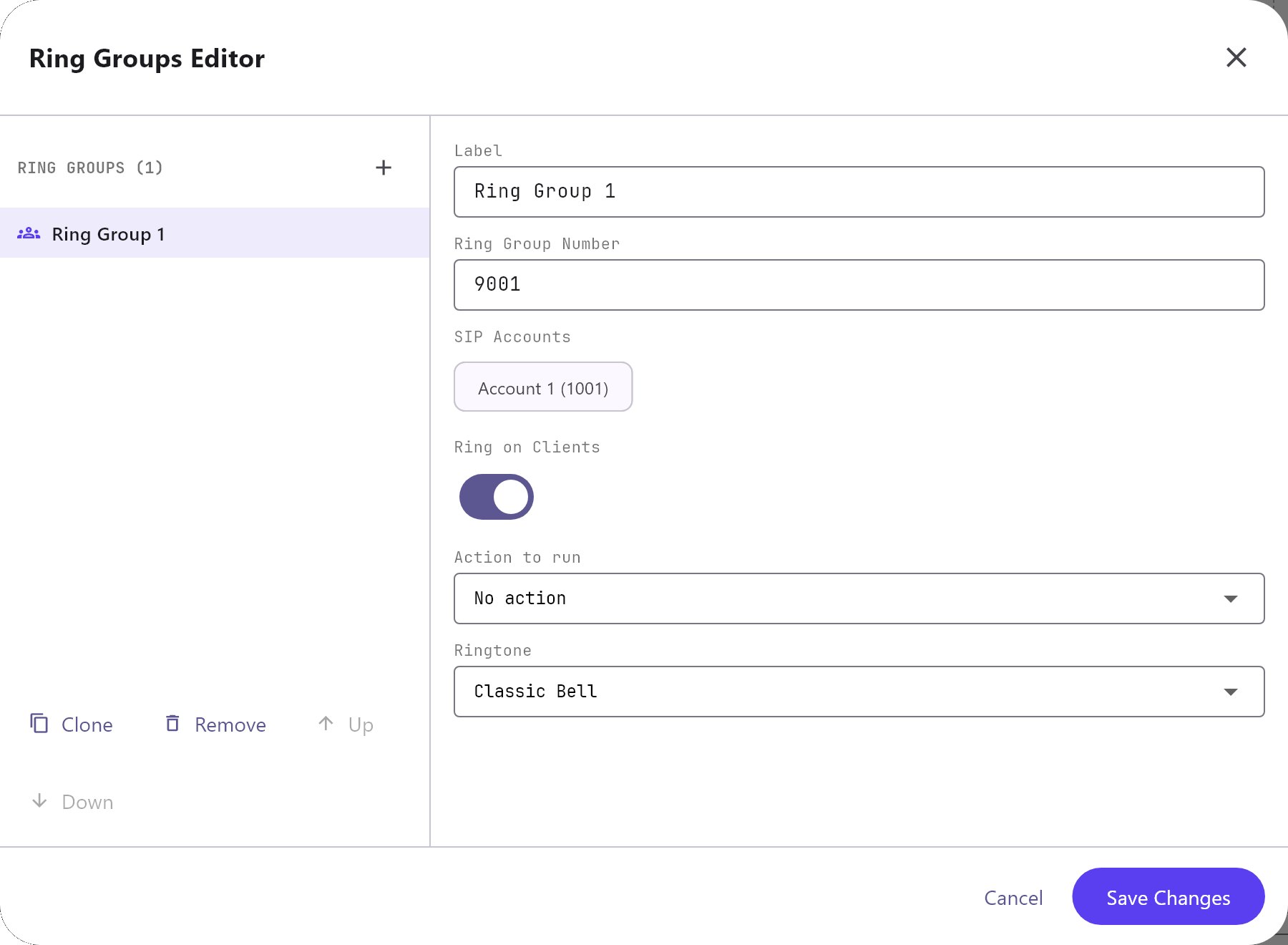
| Label | A name for the group. Default Ring Group 1. |
| Ring Group Number | The number the door station dials. New groups start at 9001. |
| SIP Accounts | The extensions that ring together. The list shows app users and extra accounts as Name (extension). If you select none, the gateway rings the first app user or account it finds. |
| Ring on Clients | On by default. When on, the apps play a ring sound for this group. |
| Action to run | No action (default), Open Panel/Page on Every Client, Write KNX Switch (DPT 1.001) or Write KNX Unsigned Byte (DPT 5). |
| Group Address | Shown for the two KNX actions. The KNX group address to write. |
| Value to Send | Shown for the unsigned byte action. 0 to 255, default 1. |
| Pulse Duration (seconds) | Shown for the switch action. 0.1 to 60, default 2. |
| Ringtone | Shown while Ring on Clients is on. Classic Bell (default), Ding-Dong Chime, Trill or Soft Chime. |
The KNX actions run once when a call starts. The switch action writes 1, then writes 0 after the pulse duration. The unsigned byte action writes the value once.
#Intercom Device editor
| Field | What it does |
|---|---|
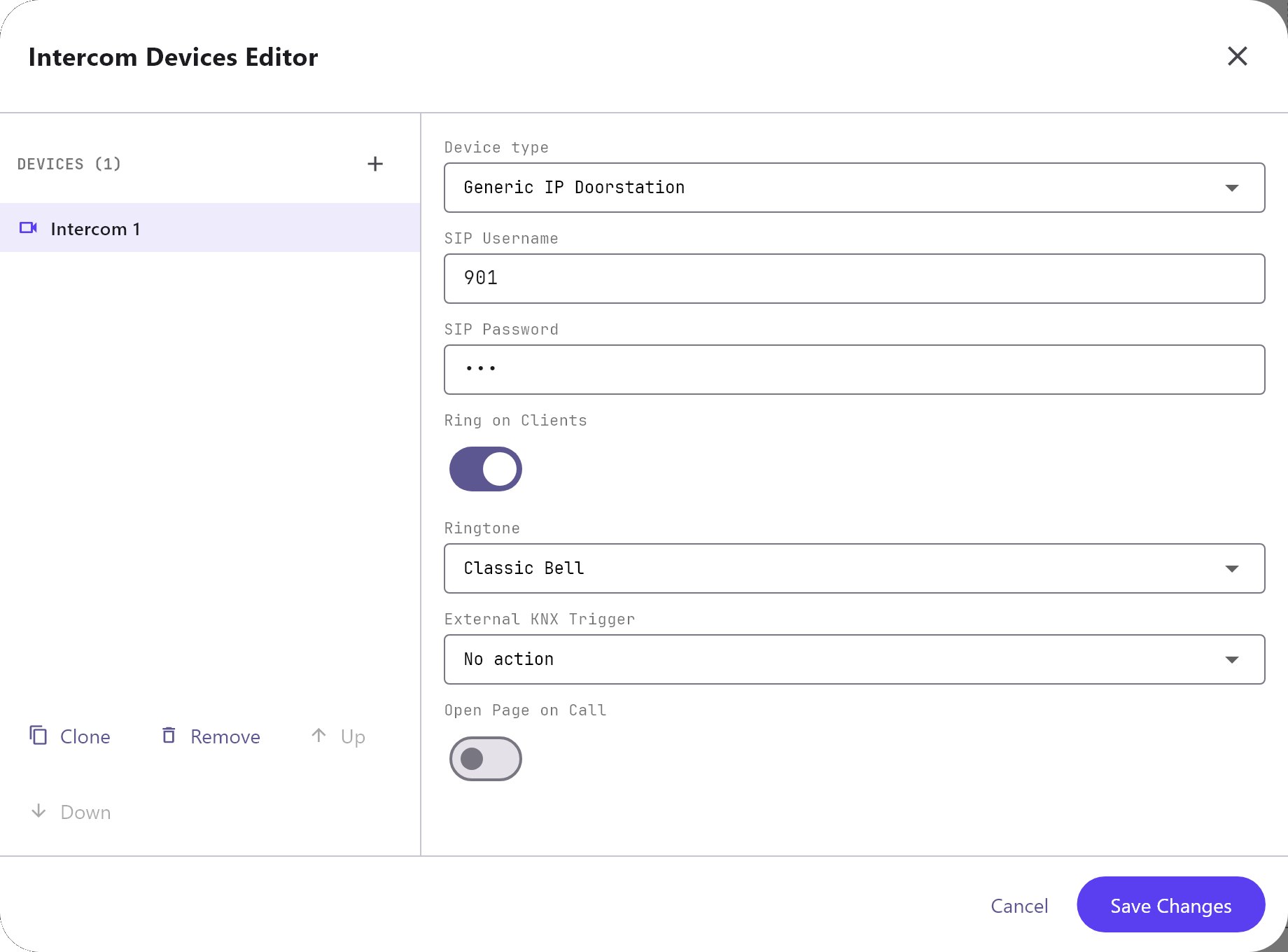
| Device type | Generic IP Doorstation (default), 2N Elios IP, Mobotix M24, TCS gateway, TCS Native, Akuvox IP Doorphone, Fanvil SIP Doorphone, Grandstream GDS Series, Hikvision IP Video Intercom or Dahua IP Video Intercom. It is a label only: it does not change how the gateway treats the call. |
| SIP Username | The username the door station registers with. New devices start at 901. Only calls from a registered intercom device are accepted. |
| SIP Password | The password the door station registers with. It defaults to the username. Choose a stronger one before going live. |
| Ring on Clients | On by default. For calls from this device, the apps use this switch and the Ringtone below instead of the ring group's. |
| Ringtone | Shown while Ring on Clients is on. The same four sounds as the ring group. |
| External KNX Trigger | No action (default), Write KNX Switch (DPT 1.001) or Write KNX Unsigned Byte (DPT 5). |
| Group Address, Value to Send, Pulse Duration (seconds) | Same as in the ring group, shown according to the trigger you choose. |
| Open Page on Call | Off by default. When on, the apps jump to the page you choose as soon as this device rings. |
| Panel, Page | Shown when Open Page on Call is on. Choose a top-level panel, then one of its pages. Choosing a panel selects its first page. |
The editor does not offer a choice of ring group for a device. The gateway attaches each device to the first group in the Ring groups list, which matters for the KNX trigger and the missed-call snapshot. Put the group your door station dials first.
#How it works on the gateway
- Apps and door stations register by SIP with a username and password. Audio goes directly between the door station and the answering app.
- A ring group call rings every registered member at once. If nobody answers within 30 seconds, the call counts as missed and the gateway saves a snapshot if one is set up.
- The ring group's KNX action and the matching device's External KNX Trigger are independent. If both are set, both write.
- Changing accounts, ring groups, device credentials or the port restarts the SIP service, so apps and door stations are unregistered until they register again. Changing only the ringtone or Open Page on Call does not restart it.
#Example
A front door station that rings two app users and pulses a KNX chime relay:
- In Server > Gateway > Users, give two users SIP extensions
1001and1002. - In Ring Group editor, set Label
Everyone, Ring Group Number9001, SIP Accounts1001and1002, Action to runWrite KNX Switch (DPT 1.001), Group Address1/4/1, Pulse Duration (seconds)2. - In Intercom Device editor, set Label
Front door, SIP Username901, choose a SIP Password, RingtoneDing-Dong Chime, Open Page on Call on, PanelHome, PageFront door. - Program the door station with the gateway address, port
5060, the SIP username and password, and9001as the call destination.
#Tips and common problems
- The door station is rejected: the SIP username and password must match an Intercom Device exactly. Without a match the call is refused with "Only intercom devices may originate calls."
- No ring on an app: the app must be registered. A ring group with members that are not registered answers the door station with "Ring Group Not Registered".
- Door release: this service does not open the door. See Intercom and door stations.