
4.7CAN
Reference for the CAN interface: the gateway's CAN port, signals read out of received frames, commands that send frames, and the Diagnostics CAN tab.
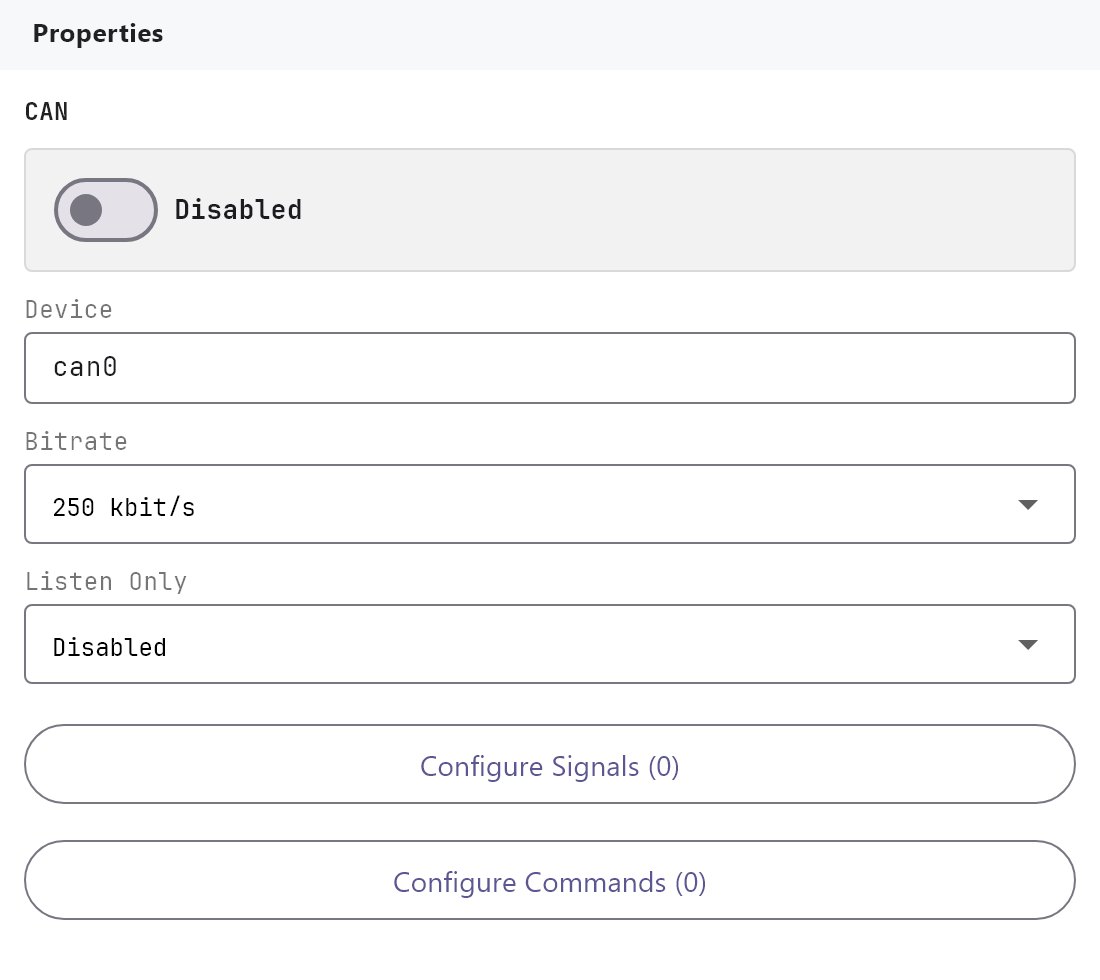
The CAN interface connects the gateway's CAN port to devices on a CAN bus. The gateway reads every frame on the bus, turns the frames you describe into reusable values (signals), and sends the frames you describe (commands). You find it under Server > Interfaces > CAN.
#What it does
- Opens the port. When Enabled is on and the project is deployed, the gateway sets the port to the chosen Bitrate and starts reading.
- Signals read a value out of one position of one frame, for example the battery voltage in bytes 0 and 1 of the frame with id
351. Each signal becomes a reusable value. Pages, Logic Studio and KNX can use it. - Commands send a frame: from an Action Button, a Logic Studio block, an automation, or when a KNX group address is written.
- Diagnostics has a CAN tab with the port's state, the latest frames, and a form to send one frame by hand.
#Before you enable it
- The gateway needs a CAN port that is enabled in its system software. If the port is not available, the CAN tab of Diagnostics reads The interface can0 was not found. The CAN port may need to be enabled on this gateway. Contact Veltnova support in that case.
- Every device on the bus must use the same Bitrate. Read it from the device's documentation. 250 kbit/s and 500 kbit/s are the most common.
- A CAN bus needs a termination resistor of 120 ohm at each end, and at least one other device on the bus that acknowledges frames. A gateway alone on a bus cannot send.
- Listen Only (the gateway never transmits, not even an acknowledgement) is not available on the Veltnova board: its CAN driver has no such mode. The gateway takes part on the bus like any normal device and acknowledges the frames it sees.
- Deploy the project after any change. Changing a setting restarts the interface.
#Settings
| Setting | What it does |
|---|---|
| Enabled | Turns the interface on or off. Off by default. |
| Device | The name of the network interface of the CAN port. Default can0. |
| Bitrate | 10, 20, 50, 100, 125, 250 (default), 500, 800 kbit/s or 1 Mbit/s. |
| Listen Only | Disabled (default) or Enabled. Keep it Disabled on the Veltnova board: its CAN driver does not support Listen Only, and with it Enabled the CAN port does not start (the CAN tab of Diagnostics reads The CAN driver of this board does not support Listen Only.). |
| Configure Signals (n) | Opens the Signals dialog. n is the number of signals. |
| Configure Commands (n) | Opens the Commands dialog. n is the number of commands. |
#Signals dialog
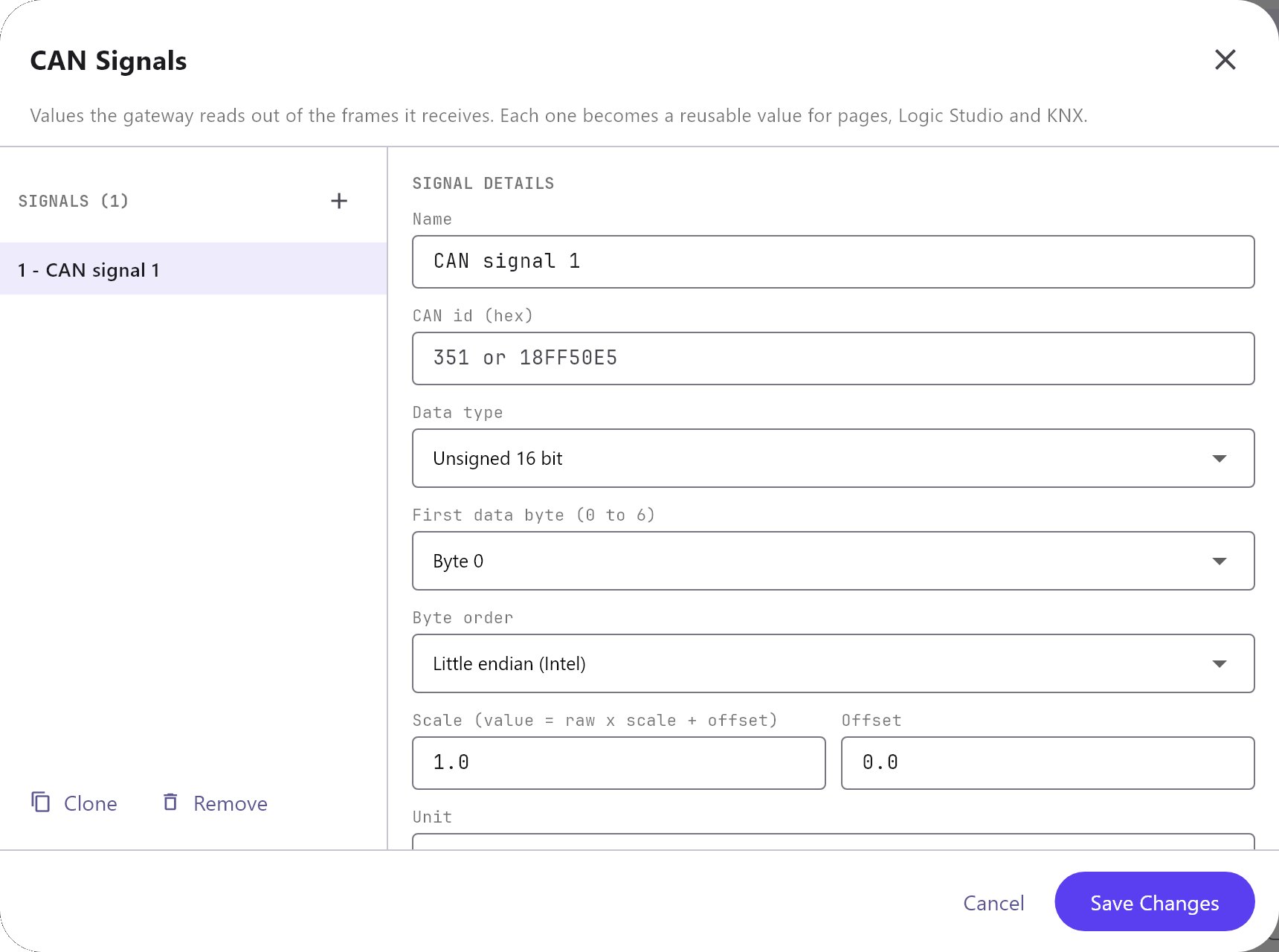
The list on the left has Add, Clone and Remove. Clone copies the signal under a new name. Changes apply as you type.
| Field | What it does |
|---|---|
| Name | The name of the signal. It also builds the default value id. |
| CAN id (hex) | The id of the frame, in hex without 0x: 351 for an 11-bit id, 18FF50E5 for a 29-bit id. An id above 7FF is read as a 29-bit id. |
| Data type | Unsigned 8 bit, Signed 8 bit, Unsigned 16 bit, Signed 16 bit, Unsigned 32 bit, Signed 32 bit, Float 32 bit or Single bit. |
| First data byte | Where the value starts in the frame data: byte 0 to 7. The choices stop at the last byte where the value still fits. |
| Bit | For Single bit: which bit of that byte, 0 is the lowest. |
| Byte order | For types longer than 1 byte: Little endian (Intel) (default) or Big endian (Motorola). |
| Scale and Offset | The value is raw x scale + offset. Defaults 1 and 0. Not used for Single bit. |
| Unit | Free text, for example V. |
| Reusable value id | The id other parts of the project use for this value. Empty means can: followed by the name in lower case, for example can:battery_voltage. |
| Also write the value to a KNX group address | Off by default. When on, the value is written to KNX group address with KNX data type (default 9.001) each time it changes. |
A frame that is too short for the signal is ignored. The value is published when it changes. To show a signal on a page, use an object with Protocol System Object: the signals are listed as CAN - name. See Using system objects.
#Commands dialog
| Field | What it does |
|---|---|
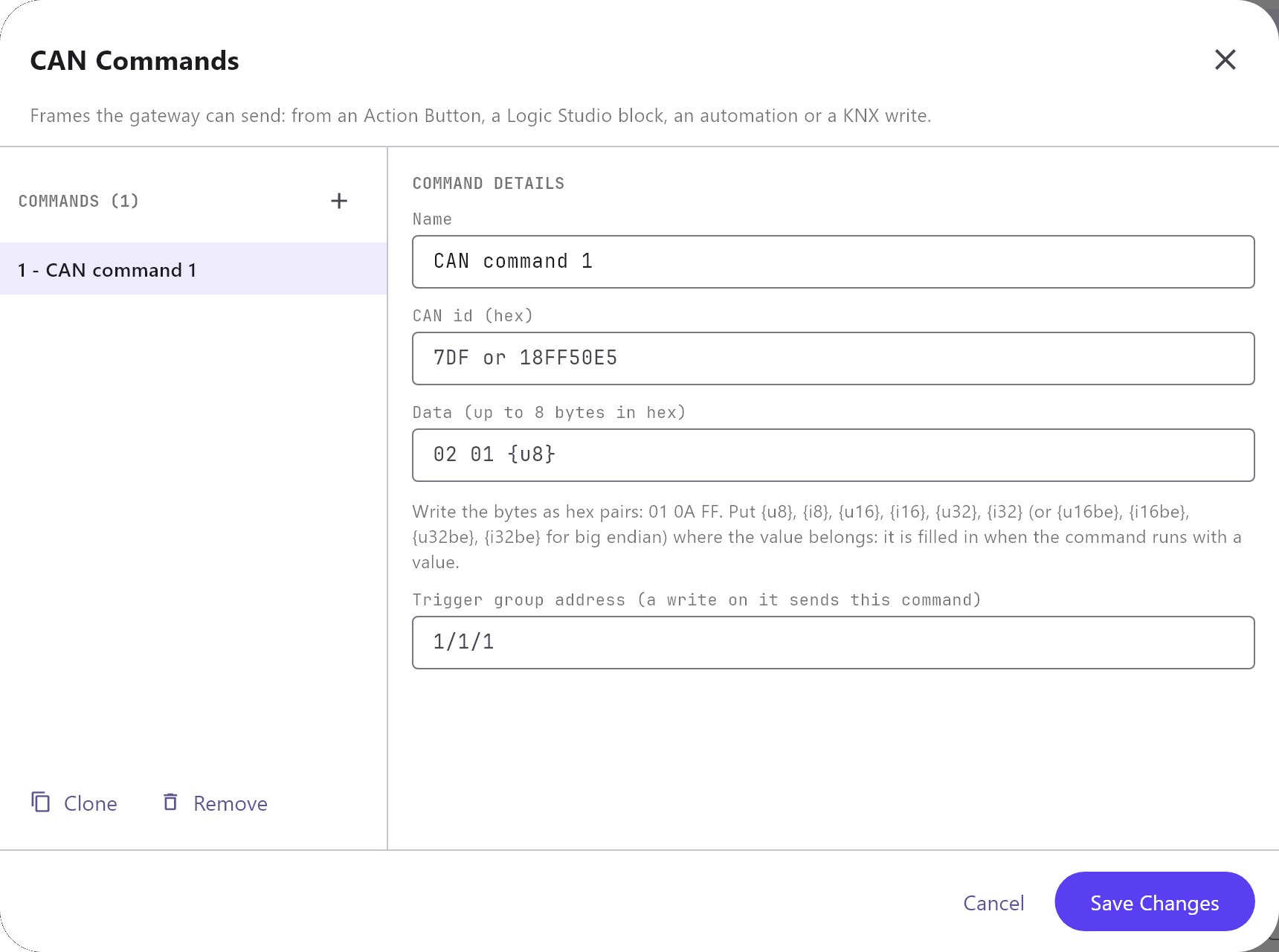
| Name | The name of the command, shown in the command list of an Action Button. |
| CAN id (hex) | The id of the frame to send. |
| Data | Up to 8 bytes in hex, separated by spaces or commas: 01 0A FF. Put {u8}, {i8}, {u16}, {i16}, {u32} or {i32} where the value belongs, or {u16be}, {i16be}, {u32be}, {i32be} for big endian. |
| Trigger group address | A KNX group address that sends this command when it is written. The value written fills the {...} of the data. |
How the value gets into the data: the Action Button command Run CAN Command has a value parameter. A Logic Studio Command block passes the value of its input. A KNX trigger passes the value of the telegram. If the data has no {...}, the value is not used. A value that does not fit the size (for example 300 in {u8}) is refused.
#Run CAN Command
In the command library of an Action Button, Run CAN Command is under CAN. Choose the command from the list of the project's CAN commands, and optionally a value. See Action Button.
#Diagnostics: the CAN tab
Diagnostics > CAN shows the state (Running, Not running or Not set up), the device and bitrate, how many frames were received and sent, the last error, and the 100 latest frames, newest first. The list refreshes every 2 seconds while the tab is open. SEND A FRAME sends one frame: type the CAN id (tick 29-bit id for an extended id) and the Data, and press Send. Sending is refused when the interface is not running or Listen Only is on.
#How it works on the gateway
- The gateway reads the bus through the Linux CAN driver. Received frames are kept in a list of the latest 200.
- If the port cannot be opened, or the reader stops, the gateway tries again every 30 seconds (every 5 seconds after a stop).
- A signal publishes its value when it changes. The same value as before does not write to KNX again.
- Commands are sent as they are, with no retry. A frame nobody acknowledges is retried by the CAN controller itself and then fails.
#Example
A battery reports its voltage in the frame 351, bytes 0 and 1, as a 16-bit number in tenths of a volt, little endian. Show it on a page and switch a charger on from a button.
- Under Server > Interfaces > CAN, switch on Enabled and choose Bitrate
500 kbit/s. - Configure Signals, Add: Name
Battery voltage, CAN id351, Data typeUnsigned 16 bit, First data byteByte 0, Scale0.1, UnitV. - Configure Commands, Add: Name
Charger on, CAN id7DF, Data02 01. - Add an Analog Value object with Protocol System Object and pick
CAN - Battery voltage. Add an Action Button with the command Run CAN Command and the commandCharger on. - Deploy the project and open Diagnostics > CAN to see the frames arrive.
#Tips and common problems
- The port is Not running and the error says the interface was not found: the CAN port is not enabled in the gateway's system software. Contact Veltnova support.
- No frames arrive: check the bitrate, the wiring (CAN high and CAN low are not interchangeable), the termination and that another device is sending.
- Frames arrive but a value stays empty: check the CAN id, 11-bit or 29-bit, and the First data byte. A signal whose bytes are not in the frame is ignored.
- The value is wrong: check Data type, Byte order, Scale and Offset against the device's documentation.
- A command does nothing: check that Listen Only is off and that at least one other device on the bus acknowledges frames.
- The port is Not running and the error mentions Listen Only: switch Listen Only off and deploy again.