
4.18Voice gateway
Reference for the Voice Gateway service: Apple Home (Siri), Alexa and Google Home control of lights, switches and fans.
The Voice Gateway lets voice assistants control the Switch, Dimmer Light, RGB Lamp and Ceiling Fan objects that you tag with a voice name. This page lists every setting of the service and says plainly which ones the gateway acts on in this version.
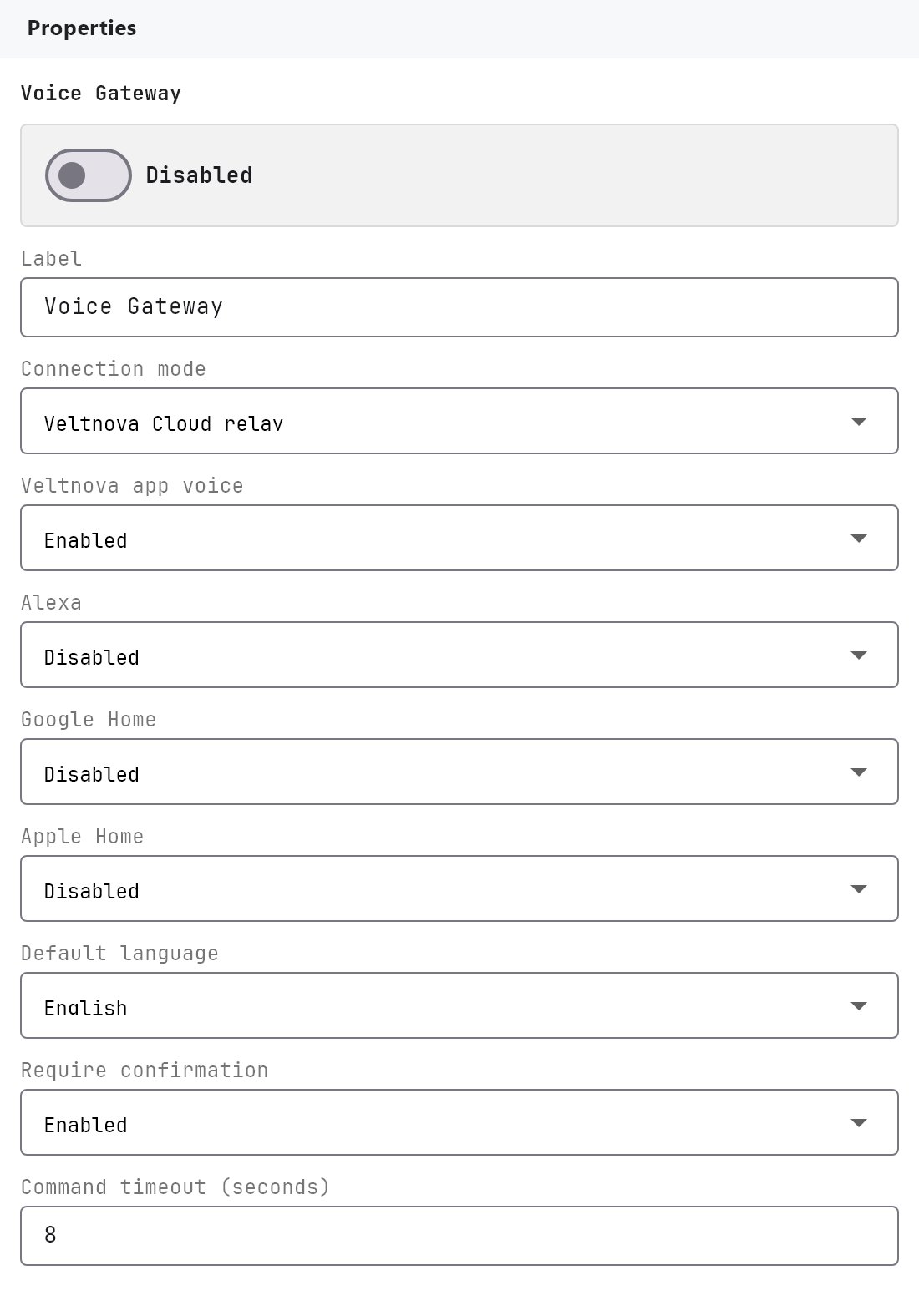
#What it does
You choose which objects can be controlled by voice by giving them a Voice Command Phrase. The gateway then offers those objects to the voice assistants:
- Apple Home (Siri): the gateway runs a local HomeKit bridge named
Veltnova Voice Bridge. After you pair it once in the Apple Home app, Siri controls the objects over your local network. - Alexa and Google Home: the Veltnova cloud answers the assistant's requests and passes each command to your gateway. This needs the gateway connected to the Veltnova cloud (see Connecting the apps).
The service publishes no System Objects.
#Before you enable it
- The service is Disabled by default. Turn Enabled on and deploy the project (see Deploying to a gateway).
- The object must be bound to KNX. Voice control writes to the object's KNX group addresses. Objects bound to Zigbee, WiFi or MQTT are not controlled by voice in this version.
- For Apple Home, set Apple Home to Enabled.
- Alexa and Google Home also need account linking in the Alexa or Google Home app. There is no setting for that in the Configurator.
#Settings
| Setting | What it does |
|---|---|
| Enabled | Turns the service on or off. Off by default. |
| Label | The name in the Server tree. Default Voice Gateway. |
| Connection mode | Veltnova Cloud relay (default) or Local gateway only. Saved and shown in the gateway console, but the gateway does not change its behaviour with it. |
| Veltnova app voice | Enabled (default) or Disabled. Saved only. Nothing in the gateway or the apps uses it. |
| Alexa | Disabled (default) or Enabled. Shown in the gateway console's Voice tab. The gateway does not check it before answering a command from the cloud. |
| Google Home | Disabled (default) or Enabled. Same behaviour as Alexa. |
| Apple Home | Disabled (default) or Enabled. Enabled starts the local HomeKit bridge. |
| Default language | English (default), Arabic or Auto detect. Saved only. |
| Require confirmation | Enabled (default) or Disabled. Saved only. |
| Command timeout | 1 to 30 seconds, default 8. Saved only. |
#Voice command phrases on objects
Four object types have a Voice group in their properties:
| Property | What it does |
|---|---|
| Voice Command Phrase | The name the assistant uses, for example Pool Lights. An object with an empty phrase is not offered to any assistant. |
| Room | An optional room name, for example Backyard. Alexa and Google Home receive it as a room hint. Apple Home ignores it: assign rooms in the Home app. |
These fields are described in Common properties.
| Object | What the assistant can do |
|---|---|
| Switch | Turn on and off. |
| Dimmer Light | Turn on and off, set brightness. |
| RGB Lamp | Turn on and off, set colour and brightness. |
| Ceiling Fan | Turn on and off, set speed in percent. |
#How it works on the gateway
- Pairing Apple Home: open the Voice tab of the gateway console. It shows the bridge status, whether it is paired, the setup code and a QR code. In the Apple Home app, choose Add Accessory and scan the code or type it. See Gateway console and logs.
- Apple Home accessories: each tagged object becomes one accessory named after its phrase. The bridge is rebuilt when a deploy changes the voice settings or the tagged objects. The pairing is kept.
- Alexa and Google Home: at every deploy the gateway sends the list of tagged objects to the cloud. The cloud answers discovery from that list. Each command is passed to your gateway, which writes the KNX group address. If the object is not in the deployed project, the command fails.
- State: the gateway answers state requests from the latest KNX value it has seen on the status group address. On/off uses the Status Group Address when set, otherwise the Group Address.
- The same tagged objects are also published to Home Assistant when MQTT discovery is on. See MQTT client.
#Example
Make the pool light controllable by Siri:
- In Server > Internal services > Voice Gateway, turn Enabled on and set Apple Home to
Enabled. - Select the Switch that controls the pool light. Under Voice, set Voice Command Phrase to
Pool Lightsand Room toBackyard. - Deploy the project.
- In the gateway console, open the Voice tab and pair the bridge in the Apple Home app.
- Say "Hey Siri, turn on the pool lights."
#Tips and common problems
- Siri says the accessory is not responding: check that the Voice tab shows the bridge as running and that Apple Home is set to
Enabled. - An object is missing from the assistant: it needs a phrase, it must be a Switch, Dimmer Light, RGB Lamp or Ceiling Fan, and it must be in the deployed project. The Voice-Tagged Devices table in the gateway console lists what the gateway sees.
- A new phrase is not picked up: deploy again. The gateway sends the list of tagged objects to the cloud at every deploy.