
4.32Solar manager
The gateway service that reads a Fronius Tauro ECO solar inverter over Modbus RTU for the Solar Panel and as a value source for the Solar Panel (Generic).
The Solar Manager is the service behind the Solar Panel and a value source for the Solar Panel (Generic). It names the Fronius Tauro ECO inverter you added as a Modbus RTU device, and the gateway then reads its production figures.
#What it does
- Reads the inverter's AC and DC figures, operating state, MPPT 1 values and lifetime energy once per poll cycle.
- Publishes them to the apps and as system values for other objects.
- Handles one inverter per project. No screen sends commands to the inverter.
#Before you enable it
- Open Server > Interfaces > RS485 Interface (or RS232 Interface), turn Enabled on and set the serial parameters of the inverter (see RS485 interface).
- Under Configure RTU Devices add a device with the driver Fronius - Tauro ECO Inverter and the inverter's Slave ID. Leave the device's own Enabled switch on. See Modbus devices and datapoints.
#Settings
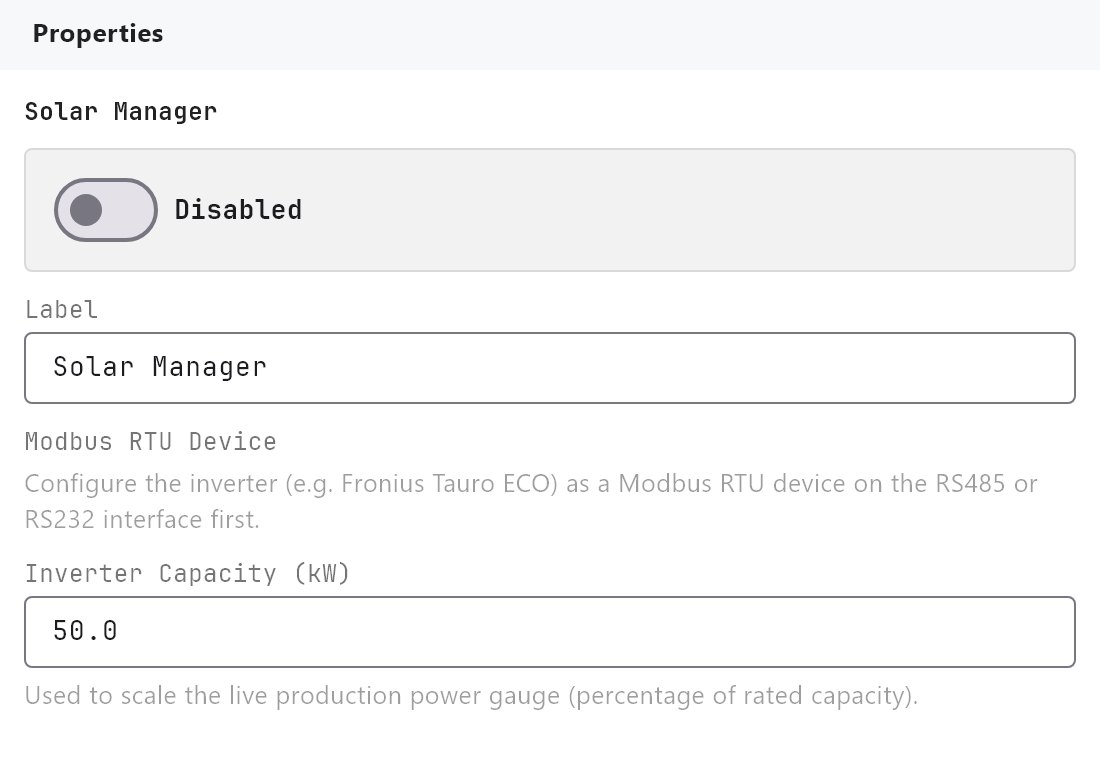
Open Server > Internal services > Solar Manager. Enabled is Off by default.
| Setting | What it does |
|---|---|
| Label | Name of the service in the Configurator. Default Solar Manager. It is also the prefix of the value names offered to other objects. |
| Modbus RTU Device | The inverter, listed as name (slave N, RS485) or name (slave N, RS232). RS485 devices are listed first. Nothing is polled until one is chosen. |
| Inverter Capacity (kW) | 1 to 5000, default 50. The rated AC power of the inverter. It is the full scale of the Production gauge in the apps. |
#How it works on the gateway
- Polling: two reads per cycle (the inverter block and the PV/MPPT block, function 03, SunSpec float map), shared with the other Modbus devices on the port. The cycle time is 2 seconds by default and cannot be changed in the Configurator.
- Values read: AC power, AC voltage, AC current, AC frequency, power factor, DC voltage, current and power, cabinet temperature, MPPT 1 voltage, current and power, lifetime energy, the inverter state, and the PV and grid connection flags. The state is one of
Off,Sleeping,Starting,MPPT,Throttled,Shutting down,FaultorStandby. - Values for other objects: the gateway also publishes them as system values named
solar:..., with power in kW and energy in kWh already converted: State, AC power, DC power, Lifetime energy, AC voltage, AC current, AC frequency, Cabinet temperature and the three MPPT 1 values. The Configurator offers them under the group Solar Manager in the Analog Value System Value list and in the Solar Panel (Generic) mapping, once a Modbus RTU Device is chosen. - Commands: the gateway software can connect or disconnect the inverter and set a power limit, but no setting in the Configurator and no control in the apps uses these functions.
#Daily history
The Solar Manager itself keeps no history. The 14 days of daily energy shown in the Veltnova client are kept per Solar Panel (Generic) object. When that object has Solar production till date mapped (the Auto-map to Solar Manager button maps it to the manager's Lifetime energy), the gateway watches that counter once a second, stores the energy produced each day for the last 14 days and keeps the running total of the current month. It also stores the last 12 completed months. History starts when the object is first deployed and is not backfilled. If the gateway is off, or cannot read the inverter, over a midnight, the energy produced during that gap is not counted in either day.
The standard Solar Panel has no history. It shows only the lifetime energy.
#Example
A 10 kW inverter on RS485 slave 1:
- RS485 Interface: Enabled on, device
Inverter, driverFronius - Tauro ECO Inverter, Slave ID1. - Solar Manager: Enabled on, Modbus RTU Device
Inverter (slave 1, RS485), Inverter Capacity (kW)10. - Add a Solar Panel to a page and deploy. For daily history, add a Solar Panel (Generic) as well and click Auto-map to Solar Manager.
#Tips and common problems
- Every reading shows
--: the interface is not enabled, the Slave ID or serial settings do not match the inverter, or no Modbus RTU Device is chosen. - The gauge is nearly empty in full sun: Inverter Capacity is set too high. The default is 50 kW.
- No history in the app: the Solar Panel (Generic) has no Solar production till date mapped, or it was deployed recently.
- The driver adds many starter datapoints that are polled like any other datapoint. The Solar Manager does not need them, so turn their Poll off or delete the ones you do not use.