
3.16Generator Panel
A full-screen generator page where you choose which value feeds each readout, with start, stop and test buttons run by the Genset Manager.
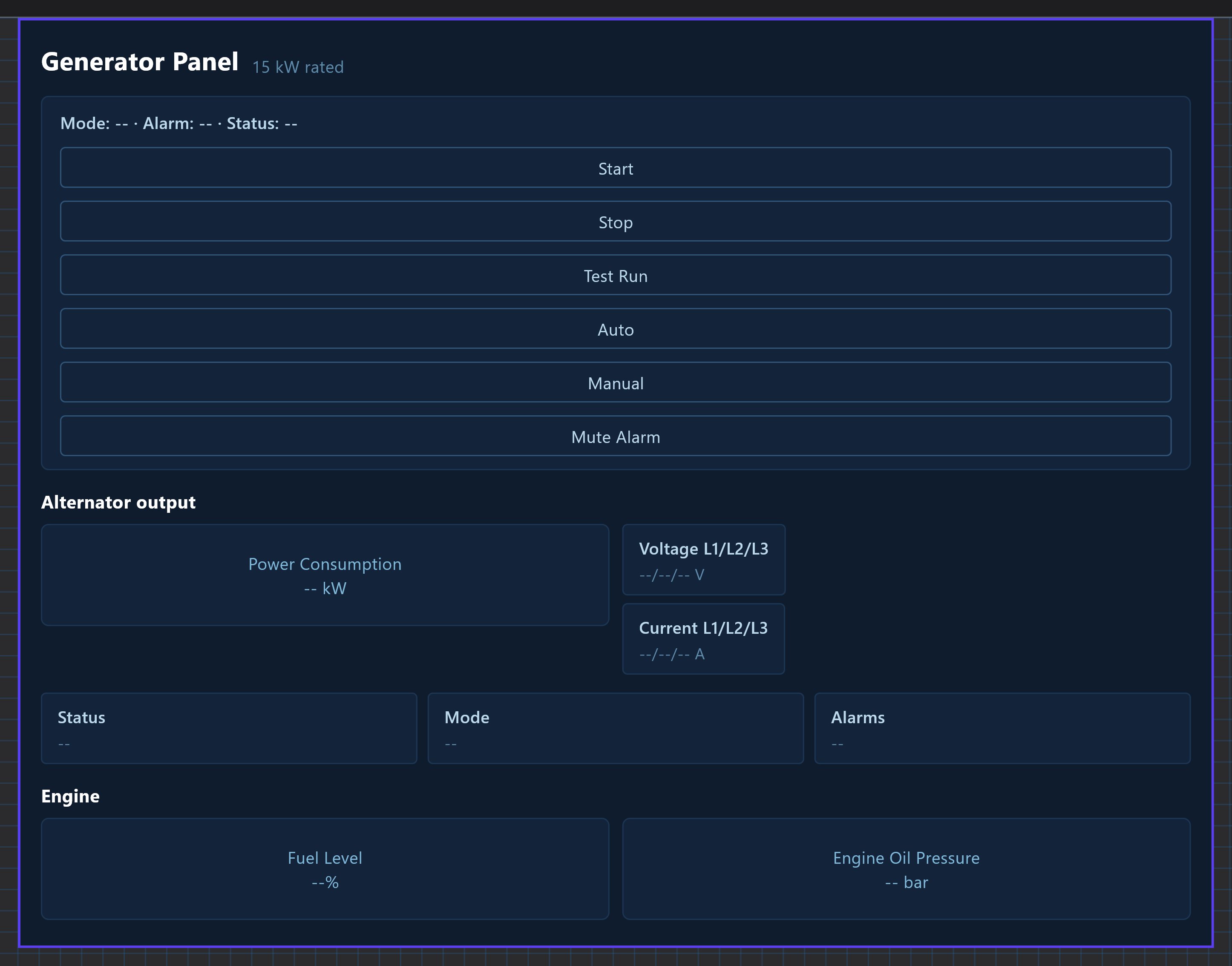
The Generator Panel shows the state and the electrical readings of a generator and has Start, Stop, Test, Manual, Auto and Mute buttons. Unlike the Genset Panel, each readout is mapped by you to a value from the Genset Manager or from any Modbus datapoint, and you can leave readouts unmapped.
#When to use it
Use it for any generator page: with a MEBAY controller (map the fields with one click) or with another controller whose values you read as ordinary Modbus datapoints. Put the panel alone on its own page: in the apps it fills the whole screen.
#What you need first
- For the readouts: each field needs a source. Either the Genset Manager (Server > Internal services > Genset Manager, with its Modbus RTU Device selected and Enabled on), or any Modbus datapoint you added under Configure RTU Devices on the RS485 or RS232 interface. See Modbus devices and datapoints.
- For the buttons: Start, Stop, Test, Manual, Auto and Mute always go through the Genset Manager, whatever the readouts are mapped to. The Genset Manager must have a Modbus RTU Device (a MEBAY DC6xD MK2 controller), otherwise a button press fails with "No Modbus RTU device configured for the genset controller." The device is chosen from the RS485 devices only.
#Properties
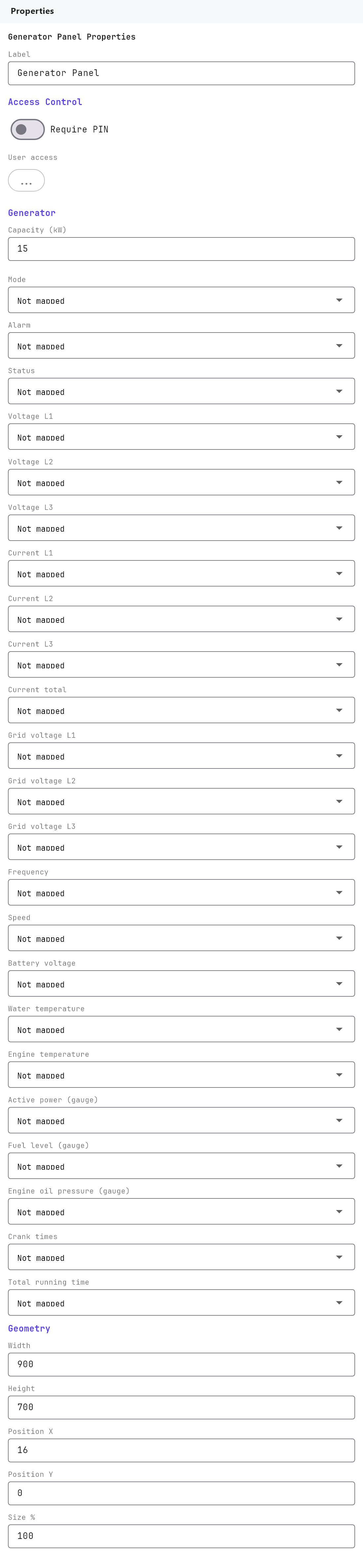
The Label, Access Control, Width, Height, Position X, Position Y and Size % fields work as described in Common properties. The Label is only a name in the Configurator. Default size is 900 by 700, used for the editor preview only. There is no Text Style or Protocol field.
| Property | What it does |
|---|---|
| Capacity (kW) | 1 to 5000, default 15. The full scale of the Power Consumption gauge. The Veltnova client also shows it as "N kW rated". |
| Auto-map to Genset Manager | A button, shown only once the Genset Manager has a Modbus RTU Device. It fills every field that the manager provides (15 of the 18) and leaves Engine oil pressure, Crank times and Total running time empty. |
#Field mapping
Every row below is a drop-down with the placeholder Not mapped. You can clear a row with the clear button. The list has a Genset Manager group (when configured) and a Modbus RTU group (every datapoint, shown as device - datapoint).
| Property | What it shows in the apps |
|---|---|
| Mode | Text in the Mode box (for example Auto). |
| Alarm | Text in the Alarm box. |
| Status | Text in the Status box. |
| Voltage L1, Voltage L2, Voltage L3 | The three voltages in volts. |
| Current L1, Current L2, Current L3 | The three currents in amps. |
| Current total | The total current in amps. |
| Frequency | Frequency in Hz. |
| Speed | Engine speed in RPM. |
| Battery voltage | Starter battery voltage in volts. |
| Active power (gauge) | The Power Consumption gauge, in kW, from 0 to Capacity (kW). |
| Fuel level (gauge) | Fuel Level gauge, 0 to 100 percent. |
| Engine oil pressure (gauge) | Engine Oil Pressure gauge, 0 to 10 bar. |
| Crank times | Shown as "N times". |
| Total running time | Shown as the text it receives. |
#How it behaves in the apps
- A status row (Mode, Alarm, Status), the six buttons, the power gauge, the voltage and current rows (L1, L2, L3 and current total), the readout list, and two smaller gauges for fuel level and oil pressure.
- An unmapped or missing field shows
--. Values are shown as received with their unit, so a Modbus datapoint should already be scaled with its own Scale setting. - The buttons are sent immediately and the Genset Manager re-reads the controller afterwards.
- The Veltnova client adds a small power chart built from the readings seen since the page was opened. It starts empty each time.
#Example
A 20 kW generator with a MEBAY DC6xD controller on slave 1, plus a separate oil pressure sensor read through a Modbus transmitter:
- Add both devices under RS485 Interface > Configure RTU Devices. For the MEBAY use the MEBAY driver. For the transmitter add a datapoint
Oil pressurewith unitbar. - In Genset Manager, Enabled on and Modbus RTU Device set to the MEBAY controller.
- Add a Generator Panel with Capacity (kW)
20. Click Auto-map to Genset Manager. - Set Engine oil pressure (gauge) to the
Oil pressuredatapoint.
#Tips and common problems
- Everything shows
--: nothing is mapped, or the source has no value yet. Use Auto-map, or choose the values by hand. - The Auto-map button is missing: the Genset Manager has no Modbus RTU Device selected yet.
- The gauge needle sits at the end: the value is above Capacity (kW). Set the rated power of the generator.
- Buttons do nothing: see "What you need first". The Genset Manager must be connected to the controller, even if the readouts come from elsewhere.
- A mapped Modbus value is 10 times too large or small: set the datapoint's Scale in the RTU device.