
3.15Genset Panel
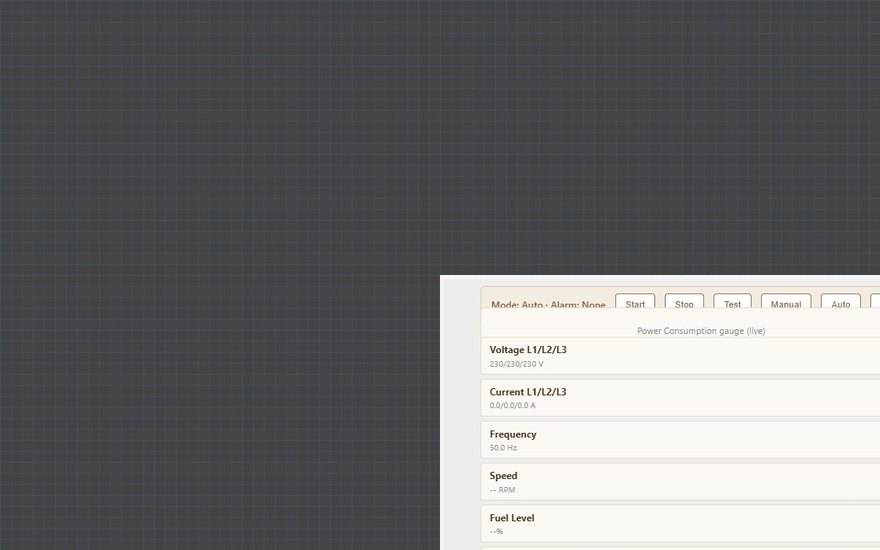
A full-screen page for a MEBAY DC6xD generator controller with start, stop, test, manual and auto buttons and live electrical readings.
The Genset Panel shows the state of a standby generator and lets the user start, stop and test it. Its layout is fixed and it reads everything from the Genset Manager. The panel itself has almost no settings.
#When to use it
Use it for a generator that has a MEBAY DC6xD MK2 controller connected to the gateway's RS485 port. If you need to choose which value appears in each field, show a controller from another maker, or leave fields out, use the Generator Panel instead. It uses the same Genset Manager for its buttons. Put the panel alone on its own page: in the apps it fills the whole screen.
#What you need first
- Modbus device. Open Server > Interfaces > RS485 Interface, turn Enabled on and set the serial parameters. Click Configure RTU Devices and add the controller with the driver MEBAY - MEBAY DC6xD MK2 Generator Controller. Set the Slave ID to the controller's address. See Modbus devices and datapoints.
- Genset Manager. Open Server > Internal services > Genset Manager and turn Enabled on.
| Genset Manager field | What it does |
|---|---|
| Label | Name of the service in the Configurator. |
| Modbus RTU Device | The controller you added in step 1. The list shows RS485 devices only. |
| Genset Capacity (kW) | 1 to 5000, default 100. The rated power of the generator. It sets the full scale of the Power Consumption gauge. |
The gateway reads the controller's status registers on a fixed MEBAY register map, so no datapoints need to be added by hand.
#Properties
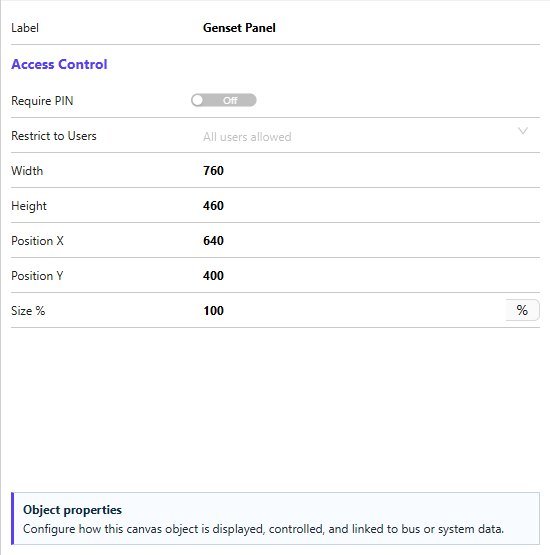
The Genset Panel has only the fields below, described in Common properties. There is no Text Style, Protocol or image field, and there is nothing to map: the Genset Manager supplies every value.
| Property | What it does |
|---|---|
| Label | A name for the object in the Configurator. It is not shown in the apps. |
| Require PIN, User access | The Access Control fields. |
| Width, Height | Default 760 by 460. Used only for the preview in the editor. |
| Position X, Position Y, Size % | Editor placement. In the apps the panel fills the screen. |
#How it behaves in the apps
- Genset Controls: a status line "Mode: ... Alarm: ..." and a line "Status: ...". Mode is the controller's switch position (Stop, Manual, Auto or Test). Status is what the controller is doing (for example "Waiting"). Alarm shows "None" or the alarm text.
- Buttons: Start, Stop, Test, Manual, Auto and Mute. Each one is sent to the controller at once, and the panel re-reads the real state afterwards. While a command is being sent the panel shows "Sending ...".
- Power Consumption gauge in kW, scaled to the Genset Capacity.
- Readings: Voltage L1/L2/L3, Current L1/L2/L3 and total, Frequency, Speed (RPM), Fuel Level, Battery Voltage and Active Power.
- A value the controller does not return is shown as
--. The Veltnova client shows "Genset controller not connected" when the connection is down. - The same Genset Manager is used by every Genset Panel and Generator Panel in the project. It controls one generator.
#Example
A 150 kW standby generator:
- In RS485 Interface, add an RTU device
Generator, driverMEBAY - MEBAY DC6xD MK2 Generator Controller, Slave ID1. - In Genset Manager, Enabled on, Modbus RTU Device
Generator, Genset Capacity (kW)150. - Add a Genset Panel on a page called
Generatorand deploy.
#Tips and common problems
- Every reading shows
--: check that the RS485 interface is enabled, the Slave ID and baud rate match the controller, and that the Genset Manager has a Modbus RTU Device selected. A button press without one returns "No Modbus RTU device configured for the genset controller." - The gauge is almost empty at full load: Genset Capacity is set too high. Set it to the generator's rated kW.
- You need oil pressure, crank counts or running hours: the Genset Panel does not show them. Use the Generator Panel, where you can map those fields to Modbus datapoints of the controller.